


Multiflash python api helps developers automate flashing detection and management of multiple devices efficiently.
If You Work With Android Flashing Unlocking Or Repair Tasks You Already Know How Frustrating It Can Be To Juggle Multiple Tools. Different Chipsets Different File Formats And Constant Errors Slow Everything Down. That’s Where Multiflash Tool Comes In Acting As A Single Powerful Solution For Professionals And Advanced Users.
Multiflash Tool V3.0 Is Designed To Handle Fastboot Qualcomm Mediatek And Spreadtrum Platforms In One Interface. Whether You Need To Read Gpt Flash Partitions Unlock The Bootloader Or Manage Nv Data This Tool Gives You Full Control Without Unnecessary Complications.
Multiflash Tool V3.0 Latest Version Free Download
The Latest Version Of Multiflash Tool V3.0 Brings Better Stability Improved Device Detection And Wider Chipset Compatibility. It Supports Ufs And Emmc Storage Advanced Partition Handling And Smart Auto-loading Features That Save Time During Flashing Operations.
What Makes This Version Stand Out Is Its Balanced Design. Beginners Can Rely On Auto Functions Like Cloud Auto Match And Auto Loader While Advanced Users Can Manually Select Partition Files Raw Xml Or Scatter Files. This Flexibility Makes The Tool Suitable For Both Repair Shops And Experienced Technicians.
What Is The Multiflash Tool?
Multiflash Tool Is An All-in-one Android Service Utility Built For Flashing Reading Writing And Erasing Device Partitions Across Multiple Platforms. Instead Of Using Separate Tools For Qualcomm Mediatek Or Spreadtrum Devices You Can Manage Everything From One Dashboard.
In Simple Terms It Acts Like A Control Center For Your Android Device. You Connect The Phone Select The Operation And The Tool Handles The Rest. From Basic Reboot Commands To Advanced Exploit Execution Multiflash Tool Is Built To Reduce Errors And Improve Workflow Efficiency.
Read More
Future Multiflash Tool
Fastboot Mode
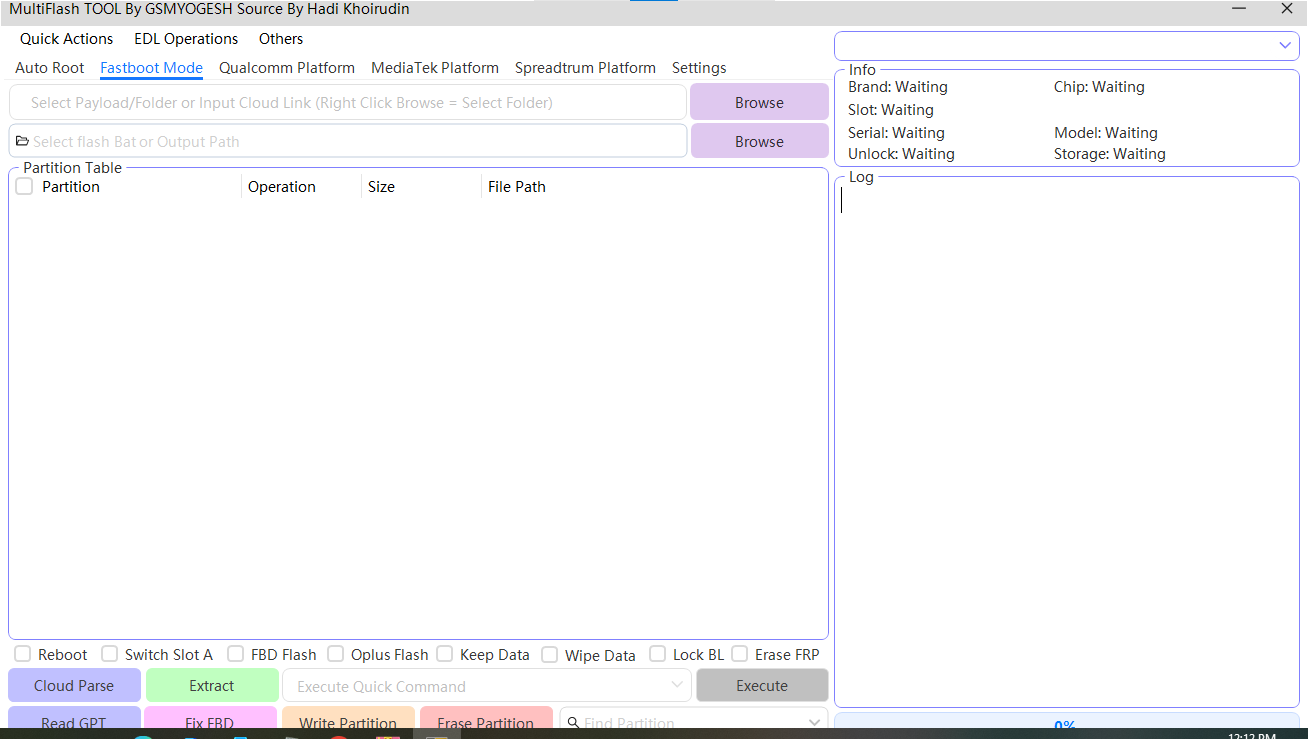
Multiflash manual tool used for manual firmware flashing and device managemen
- Partition table view
- Select individual partitions
- Operation type per partition
- Partition size display
- Manual partition file path selection
- Find partition feature
qualcomm platfoam

An example of multi flash photography where repeated flashes freeze motion at different moments in one image.
- Cloud Auto Match
- Auto Loader
- Select Raw XML
- UFS / eMMC Select
- Read GPT
- Read Partition
- Write Partition
- Erase Partition
- Reboot Device
- Skip Bootloader
- Generate XML
- Keep Data
- Device Info Detection (Brand, Model, Chip, Storage)
- Log Monitoring
Media Tek Pateform
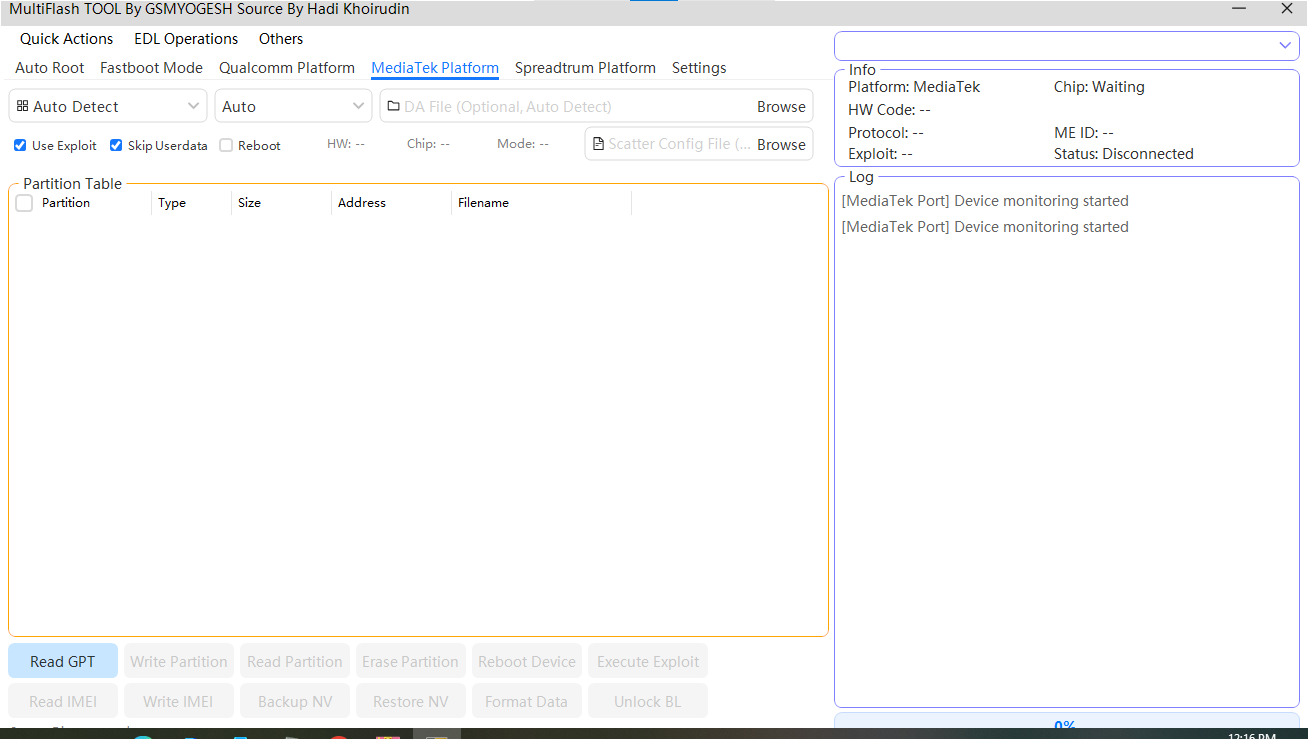
Multiflash kbc is a powerful tool used for flashing repairing and managing android smartphones efficiently.
- Auto Detect Device
- DA File Load (Auto / Manual)
- Scatter File Load
- Use Exploit
- Skip Userdata
- Read GPT
- Write Partition
- Read Partition
- Erase Partition
- Reboot Device
- Execute Exploit
- Format Data
- Unlock Bootloader
- Read / Write IMEI
- Backup NV
- Restore NV
- Device Status & Log Monitoring
Spreadtrum Pleatform
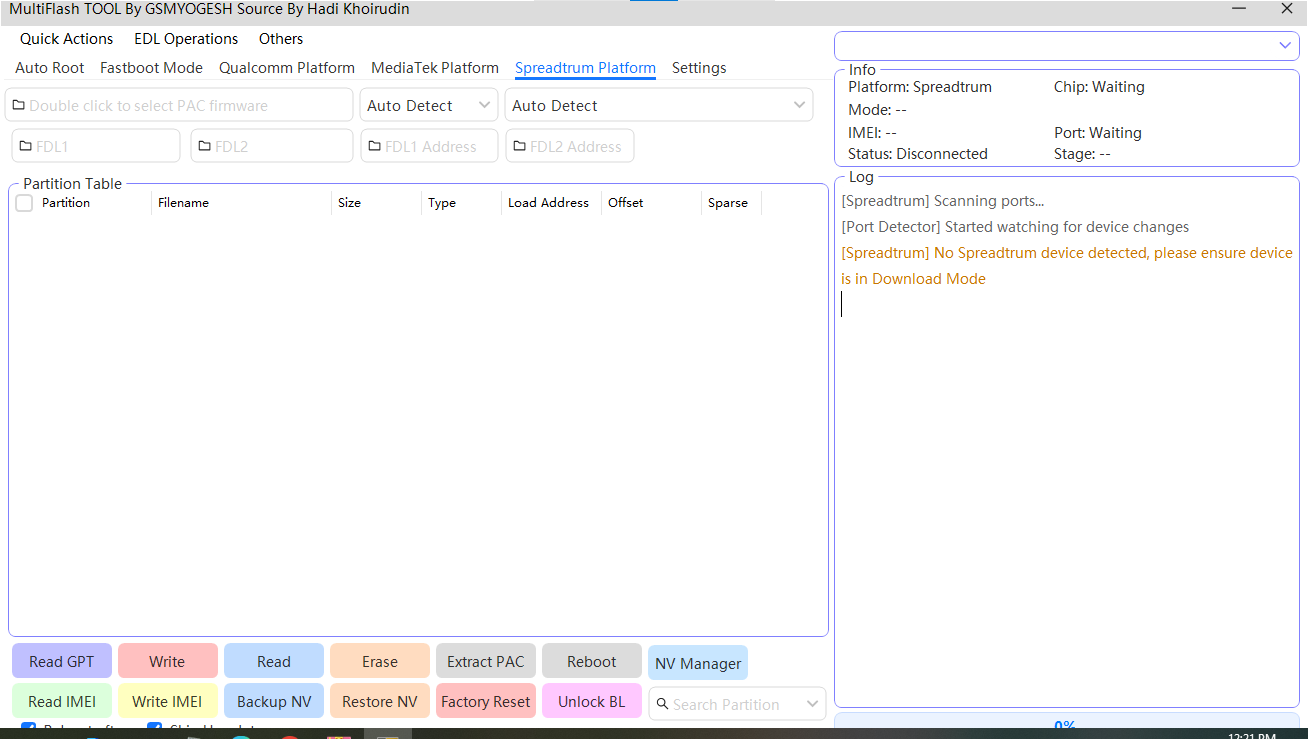
Easy multiflash tutorial explaining how to flash devices safely using the multiflash tool.
- Read GPT
- Write (Flash)
- Read
- Erase
- Extract PAC
- Reboot
How To Use It ?
- First Of All, You Must Get The Zip File By Clicking The Following Link
- After That, You Need To Unzip All Files In C: Drive (important)
- Make Sure You’ve Turned Off The Antivirus To Running The Installation
- Then, To Open The Folder, Download The Installation File Following Some Basic Instructions
- Run The “MultiFlash Tool“
- The Will Open On Your Pc Screen.
Enjoy!
Final Thoughts
Multiflash Tool V3.0 Is A Complete Android Flashing And Repair Solution Built For Speed Accuracy And Flexibility. With Support For Fastboot Qualcomm Mediatek And Spreadtrum Platforms It Eliminates The Need For Multiple Tools.
If You’re Serious About Android Repair Flashing Or Development Work This Tool Deserves A Place In Your Toolkit. It’s Powerful Reliable And Designed With Real Users In Mind.
How To Download ?
- Visit The Gsm Crack Tool Website Of The Tool.
- Find The Download Page And Don’t Click Button And Click Only The (Download Link)
- Once The Download Is Complete, Locate The Downloaded File On Your Device.
- Tap On The File To Begin The Installation Process.
- Follow The On-screen Instructions To Complete The Installation.Prime.
MultiFlash Tool
Download here:


