


Download droid4x 0. 10. 6 beta android emulator for pc with smooth gaming and app testing features.
If Your Android Phone Gets Stuck On The Logo Screen Boot Loop Or Recovery Mode Fixing It Can Feel Like Trying To Untangle Earphones In Your Pocket—Annoying And Messy. That’s Where Deroid Unbricker Tool Comes In. This Lightweight Windows Utility Helps Android Users Repair Software Issues Access Different Phone Modes And Manage Adb Functions In One Place.
Many Users Need A Simple Tool To Reboot Devices Enter Fastboot Mode Or Open Edl 9008 Without Complicated Commands. Deroid Unbricker Tool Pro V1.0 Offers These Features
What Is The Deroid Unbricker Tool?
Deroid Unbricker Tool Is An Android Utility Built To Recover Devices Facing Software Problems. If Your Device Is Soft-bricked Stuck In Recovery Or Not Detected Correctly This Tool Can Help Restore Access.
It Combines Multiple Android Repair Functions Inside One Panel. You Don’t Need To Memorize Terminal Commands Or Install Many Separate Utilities.
Tool Overview
The Software Focuses On:
- Android Repair
- Fastboot Management
- Recovery Mode Access
- Driver Installation
- Adb Tools
Supported Android Devices
The Tool Works With Many Android Brands That Support:
- Adb Mode
- Fastboot Mode
- Qualcomm Edl Mode
Through An Easy Interface Making Android Repair Much Faster.
Deroid Unbricker Tool Pro V1.0 Latest Version Free Download
Deroid Unbricker Tool Pro V1.0 Is A Free Android Repair Software Designed For Users Who Work With Flashing Unbricking And Device Maintenance. It Includes Several Useful Functions For Managing Android Phones Through Adb Fastboot Recovery And Edl Modes.
The Latest Version Supports Multiple Android Operations From One Dashboard. Instead Of Opening Command Prompt Again And Again You Can Control Important Functions With A Single Click.
Read More
Features DEROID Unbricker Tool Pro v1.0
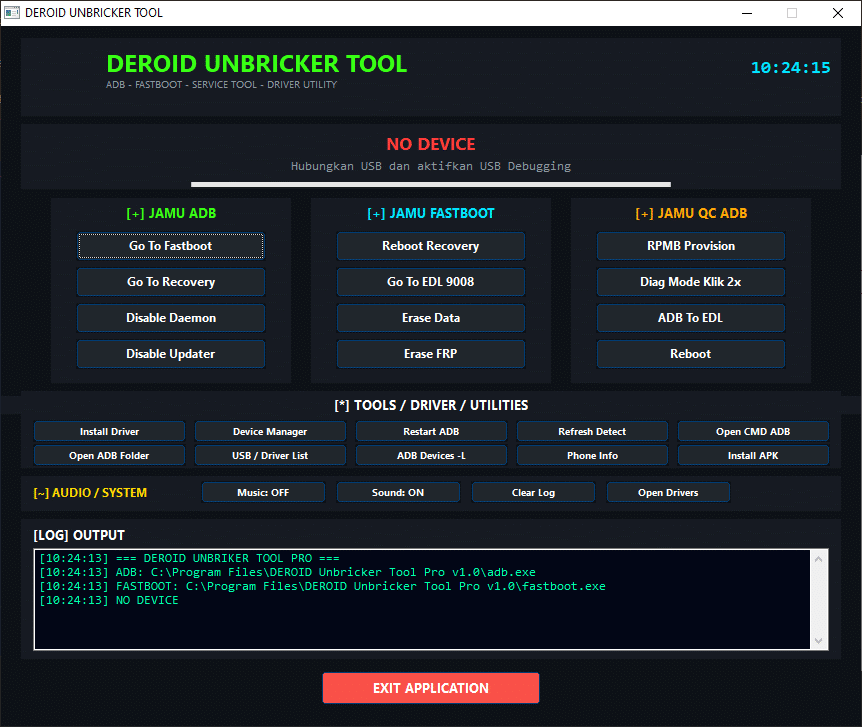
Unbrick android tool used to recover and fix android phones stuck in bootloop or dead state
- Go To Fastboot
- Go To Recovery
- Disable Daemon
- Disable Updater
- Reboot Recovery
- Go To EDL 9008
- Erase Data
- RPMB Provision
- Diag Mode Klik 2x
- ADB To EDL
- Reboot
- Install Driver
- Device Manager
- Restart ADB
- Refresh Detect
- Open CMD ADB
- Open ADB Folder
- USB / Driver List
- ADB Devices -L
- Phone Info
- Install APK
- Music OFF
- Sound ON
- Clear Log
- Open Drivers
How To Use It ?
- First Of All, You Must Get The Zip File By Clicking The Following Link
- After That, You Need To Unzip All Files In C: Drive (important)
- Make Sure You’ve Turned Off The Antivirus To Running The Installation
- Then, To Open The Folder, Download The Installation File Following Some Basic InstructionsKleister and PDT Platform Detector Tool
- Run The “DEROID Unbricker Tool“
- The Will Open On Your Pc Screen.
Enjoy!
Final Thought
If You Need An All-in-one Android Repair Tool Deroid Unbricker Tool Is Worth Downloading. It Offers Useful Features Like Fastboot Access Recovery Reboot Edl 9008 Mode Driver Installation And Adb Utilities In One Lightweight Package.
For Users Who Frequently Troubleshoot Android Phones This Tool Can Save Both Time And Effort. Instead Of Juggling Multiple Utilities You Get One Practical Toolbox Ready To Go.
How To Download ?
- Visit The Gsm Crack Tool Website Of The Tool.
- Find The Download Page And Don’t Click Button And Click Only The (Download Link)
- Once The Download Is Complete, Locate The Downloaded File On Your Device.
- Tap On The File To Begin The Installation Process.
- Follow The On-screen Instructions To Complete The Installation.Prime.
DEROID Unbricker Tool


