Getting Stuck With A Locked Xiaomi Phone Can Feel Frustrating Especially When You Just Want Quick Access To Your Device. Maybe Your Phone Is Stuck In Bootloop Or You’re Unable To Unlock The Bootloader Using Official Methods. That’s Where The Xiaomi Temporary Unlock Tool Comes In As A Practical And Time-saving Solution.
Instead Of Dealing With Complicated Commands Or Risky Methods This Tool Gives You A Smoother Way To Manage Unlocking Tasks. It’s Designed For Both Beginners And Advanced Users Who Want A Simple And Efficient Unlocking Experience Without Unnecessary Hassle.
Xiaomi Temporary Unlock Tool Latest Version Free Download
If You’re Looking For A Reliable Way To Unlock Your Xiaomi Device The Latest Version Of This Tool Offers Improved Performance And Better Compatibility. It’s Lightweight Easy To Install And Works Seamlessly With Most Xiaomi Models.
You Don’t Need Deep Technical Knowledge To Use It. With Its Simple One-click Operations Even A Beginner Can Handle Tasks Like Flashing Rebooting Or Unlocking Without Confusion. That’s What Makes It A Popular Choice Among Android Users.
What Is The Xiaomi Temporary Unlock Tool?
The Xiaomi Temporary Unlock Tool Is A Specialized Software Designed To Help Users Temporarily Unlock Xiaomi Devices For Flashing Repair And Testing Purposes. It Allows Access To System-level Operations Without Permanently Modifying The Device.
In Simple Terms It Acts Like A Bridge Between Your Phone And Advanced Functions Such As Fastboot And Adb Commands. This Makes It Especially Useful For Technicians Or Users Dealing With Software Issues Like System Crashes Or Frp Locks.
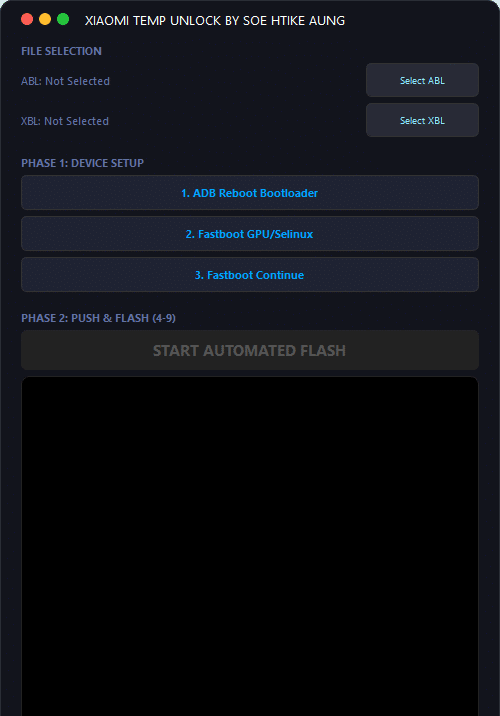
Features Xiaomi Temp Unlock Tool
ABL File Selection
XBL File Selection
ADB Reboot to Bootloader
Fastboot GPU / Selinux Control
Fastboot Continue Option
Automated Flash Process
Push & Flash (Step 4–9 Support)
Simple One-Click Operation
Clean & Easy Interface
How To Use It ?
First Of All, You Must Get The Zip File By Clicking The Following Link
After That, You Need To Unzip All Files In C: Drive (important)
Make Sure You’ve Turned Off The Antivirus To Running The Installation
Then, To Open The Folder, Download The Installation File Following Some Basic InstructionsKleister and PDT Platform Detector Tool
Run The “Xiaomi Temporary Unlock Tool“
The Will Open On Your Pc Screen. Enjoy!
Final Thought
The Xiaomi Temporary Unlock Tool Is A Practical Solution For Users Who Want A Simple And Effective Way To Unlock And Manage Xiaomi Devices. It Combines Powerful Features With An Easy-to-use Interface Making It Suitable For Both Beginners And Professionals.
If You Often Deal With Xiaomi Flashing Or Unlocking Tasks This Tool Can Save You A Lot Of Time And Effort. Just Use It Carefully And Follow Proper Steps For The Best Results.
How To Download ?
Visit The Gsm Crack Tool Website Of The Tool.
Find The Download Page And Don’t Click Button And Click Only The (Download Link)
Once The Download Is Complete, Locate The Downloaded File On Your Device.
Tap On The File To Begin The Installation Process.
Follow The On-screen Instructions To Complete The Installation.Prime.