


Dinosaur tool kg mdm it admin tool dashboard for kg lock and mdm bypass operations
If You’ve Ever Faced It Admin Restrictions Unexpected Ota Updates Or Android Version Issues The Uit It-admin Fix Tool Is Your Ultimate Solution. This Versatile Tool Allows You To Bypass It Admin Controls Fix Android Errors And Manage Device Settings With Ease. Whether You Own A Vivo Oppo Oneplus Motorola Or Redmi Device This Tool Gives You Complete Control Over Your Smartphone’s Functionality.
With A User-friendly Interface And Powerful Utilities Like Qr Code Display And Android 13–15 Fixes The Uit It-admin Fix Tool Ensures Even Beginners Can Solve Device Issues Quickly. It’s Designed To Streamline Your Workflow Prevent Unwanted Interruptions And Restore Device Performance.
Uit It-admin Fix Tool V1 Latest Version Free Download
The Latest Version Of The Uit It-admin Fix Tool Comes Packed With Essential Features. It Supports Android 13 14 And 15 Fixes Offers Ota Disable Options For Multiple Brands And Provides Utilities Like Screen Mirroring And Factory Reset Enablement. You Can Now Manage Updates Restore Play Store Functionality And Handle It Admin Restrictions Without Technical Headaches.
Whether You’re A Professional Technician Or A Casual User This Tool Is Designed For Efficiency And Reliability. Lightweight And Intuitive It Ensures Your Device Stays Secure And Performs Optimally.
What Is The Uit It-admin Fix Tool?
The Uit It-admin Fix Tool Is A Specialized Software Designed To Bypass It Admin Restrictions And Fix Device-specific Android Issues. It Allows Users To Regain Full Control Over Their Devices While Ensuring Compatibility With Android 13–15. With Built-in Fixes For Common Problems This Tool Makes Device Management Easier And Faster.
It’s Perfect For Anyone Looking To Disable Ota Updates Fix Android Version Issues Or Restore Og Play Store Functionality. The Tool Integrates Features That Simplify Device Administration And Prevent Unexpected Interruptions.
Read More
Feature UIT IT-ADMIN FIX
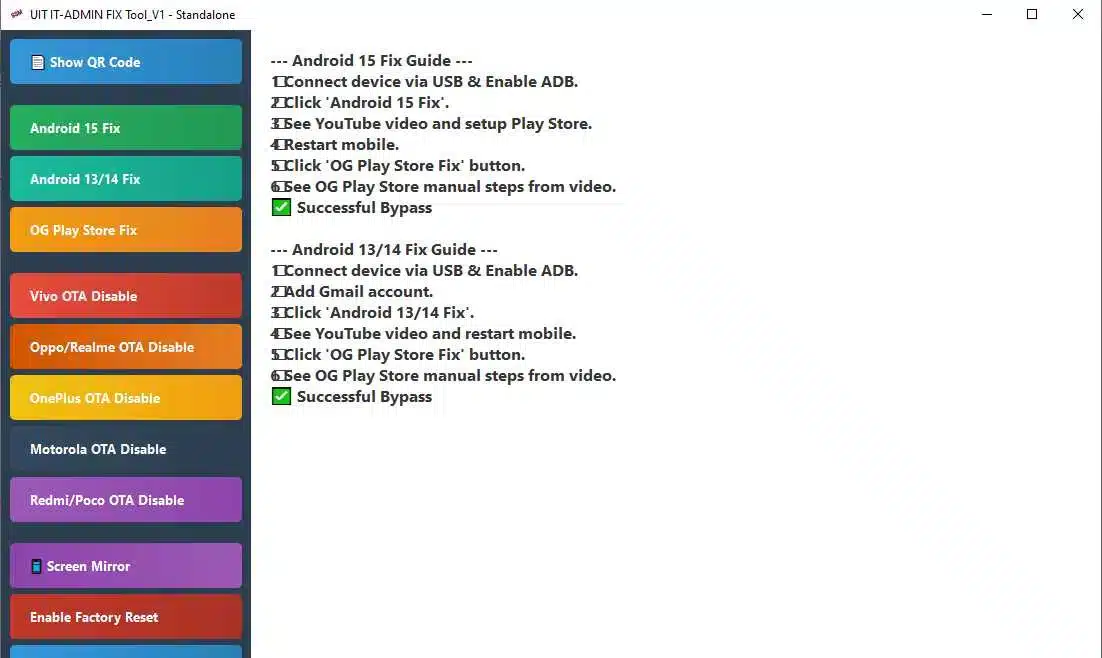
Download uit it admin fix tool v1 apk for android device management and it admin lock solutions.
- Show QR Code
- Android 15 Fix
- Android 13/14 Fix
- OG Play Store Fix
- Vivo OTA Disable
- Oppo/Realme OTA Disable
- OnePlus OTA Disable
- Motorola OTA Disable
- Redmi/Poco OTA Disable
- Screen Mirror
- Enable Factory Reset
How To Use It ?
- First Of All, You Must Get The Zip File By Clicking The Following Link
- After That, You Need To Unzip All Files In C: Drive (important)
- Make Sure You’ve Turned Off The Antivirus To Running The Installation
- Then, To Open The Folder, Download The Installation File Following Some Basic Instructions
- Run The “UIT IT-ADMIN FIX Tool“
- The Will Open On Your Pc Screen.
Enjoy!
Final Thought
The Uit It-admin Fix Tool Is A Must-have Utility For Anyone Dealing With Android It Admin Restrictions Or Device Errors. Its Comprehensive Feature Set—from Ota Disable To Android 15 Fixes—ensures Your Device Stays Functional And Under Your Control. By Following The Installation Steps And Safety Tips You Can Enjoy A Seamless Experience And Unlock The Full Potential Of Your Android Device.
Whether You’re A Tech Professional Or A Casual User This Tool Makes Managing Troubleshooting And Maintaining Devices Easier Than Ever. Download It Today And Experience Complete Control Over Your Smartphone Like Never Before.
How To Download ?
- Visit The Gsm Crack Tool Website Of The Tool.
- Find The Download Page And Don’t Click Button And Click Only The (Download Link)
- Once The Download Is Complete, Locate The Downloaded File On Your Device.
- Tap On The File To Begin The Installation Process.
- Follow The On-screen Instructions To Complete The Installation.Prime.
UIT IT-ADMIN FIX Tool


