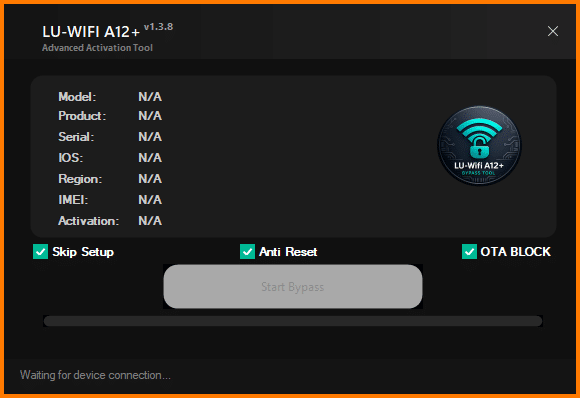
Dealing With Locked Or Restricted Iphones Can Be Frustrating Especially When You Just Want Quick Access To Your Device. That’s Where The Lu-wifi A12+ Tool Comes In. It’s Designed To Simplify Complex Ios Tasks Like Activation Checks Bypass Processes And Device Information Reading—all In One Place.
Whether You’re A Technician Or A Regular User This Tool Gives You A Practical Way To Handle Common Ios Issues Without Juggling Multiple Programs. In This Guide You’ll Learn What It Does How It Works And Why It’s Becoming A Go-to Choice For Many Users.
If You’re Looking For A Reliable Ios Utility The Lu-wifi A12+ Tool Latest Version Offers A Clean Interface And Efficient Performance. It Combines Multiple Features Into One Dashboard Saving You Both Time And Effort. You Don’t Need Advanced Technical Skills To Get Started Which Makes It Accessible For Beginners As Well.
Downloading The Latest Version Ensures You Get Updated Compatibility And Improved Stability. However Always Choose Trusted Sources To Avoid Corrupted Files Or Malware. A Safe Download Means A Smooth Experience Right From The Start.
What Is The Lu-wifi A12+ Tool?
The Lu-wifi A12+ Tool Is A Specialized Software Designed For Handling Ios Device Operations. It Helps Users Manage Activation Status Retrieve Device Information And Perform Bypass-related Tasks With Ease. Think Of It As A Multi-purpose Toolkit For Iphone Troubleshooting.
In Simple Terms It Acts Like A Bridge Between Your Computer And Ios Device. Once Connected You Can Access Important Functions Without Complicated Steps. This Makes It Especially Useful For Mobile Repair Technicians And Users Dealing With Locked Devices.
LU-WIFI A12+ Tool Features
Device Information Read (Model, Product, Serial, iOS, Region, IMEI)
Activation Status Check
Skip Setup Option
Anti Reset Protection
OTA Block Feature
One Click Start Bypass
Auto Device Detection
Live Status / Log Panel
Progress Bar Indicator
Waiting for Device Connection System
How To Use It ?
First Of All, You Must Get The Zip File By Clicking The Following Link
After That, You Need To Unzip All Files In C: Drive (important)
Make Sure You’ve Turned Off The Antivirus To Running The Installation
Then, To Open The Folder, Download The Installation File Following Some Basic InstructionsKleister and PDT Platform Detector Tool
Run The “Lu-wifi A12+ Tool“
The Will Open On Your Pc Screen. Enjoy!
Conclusion
The Lu-wifi A12+ Tool Stands Out As A Practical And Efficient Solution For Handling Ios Device Tasks. From Reading Device Information To Bypassing Activation Locks It Offers Everything In A Simple Interface.
If You’re Tired Of Complicated Tools And Want Something That Just Works This Is Worth Trying. With The Right Approach And A Safe Download You Can Make Your Ios Troubleshooting Faster Easier And Far More Effective.
How To Download ?
Visit The Gsm Crack Tool Website Of The Tool.
Find The Download Page And Don’t Click Button And Click Only The (Download Link)
Once The Download Is Complete, Locate The Downloaded File On Your Device.
Tap On The File To Begin The Installation Process.
Follow The On-screen Instructions To Complete The Installation.Prime.