


Pdt cpu detector software interface for identifying smartphone cpu details and chipset information.
If You’re A Tech Professional Repair Specialist Or Simply Someone Who Works With Device Dumps And Firmware Files The Kleister And Pdt Platform Detector Tool V1.0.7 Is A Must-have. This Tool Simplifies Tasks Like Merging Files Detecting Device Platforms And Managing Dumps In One Easy-to-use Interface. Whether You’re Handling Multiple Devices Or Analyzing Firmware This Tool Ensures Efficiency And Accuracy.
The Software Is Designed To Be Intuitive Making It Accessible For Both Beginners And Advanced Users. From Monitoring Progress Bars To Verifying Firmware Integrity Every Feature Is Optimized To Save Time And Reduce Errors.
What Is The Kleister And Pdt Platform Detector Tool?
The Kleister And Pdt Platform Detector Tool Is An All-in-one Solution For Device Dump Management And Platform Detection. It Provides A Centralized Hub Where You Can Merge Files Extract Data And Perform Advanced Operations Without Juggling Multiple Tools. Its Core Purpose Is To Streamline Workflows And Minimize Human Error During Complex Tasks.
Overview Of Merge Files / Kleister Functionality
The Merge Files / Kleister Feature Allows You To Combine Multiple Dump Files Into A Single Organized File. This Is Particularly Useful When Dealing With Fragmented Data Or Multiple Firmware Partitions. Simply Select Your Files Arrange Them With Move Up Or Move Down And Click Merge. The Tool Handles The Rest Efficiently.
How Pdt / Platform Detector Works
The Pdt / Platform Detector Identifies The Device Platform Automatically From Connected Dumps. By Pressing Start—or Holding Both Volume Keys While Connecting The Device Via Usb—the Tool Scans And Displays Ready Status With A Progress Bar. This Ensures Precise Operations And Reduces Guesswork When Flashing Analyzing Or Dumping Device Data.
Read More
Future Kleister And Pdt Platform Detector Tool
Merge Files / Kleister
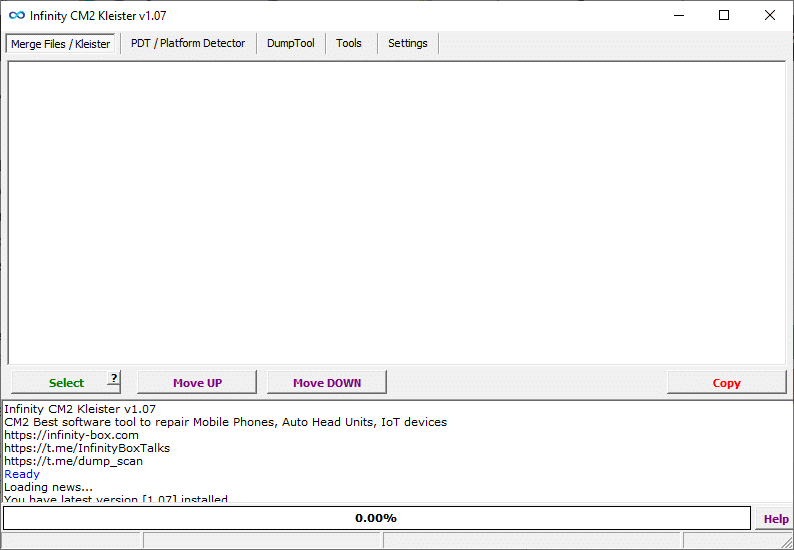
Download kleister and pdt platform detector tool to detect device platform and chipset details quickly and accurately.
- PDT / Platform Detector
- DumpTool
- Tools
- Settings
- Select
- Move UP
- Move DOWN
- Copy
- Ready Status
- Progress Bar (0.00%)
- Help Button
PDT / Platform Detector

Infinity cm2 platform detector tool v1. 02 main dashboard with device platform identification features
- Start
- Stop
- Instruction Message (Click to Start, Hold BOTH volume keys and insert USB cable)
- Ready Status
- Progress Bar (0.00%)
- Help Button
DumpTool

Platform detector tool free version for detecting device chipset and platform details quickly.
- Merge Files / Kleister
- PDT / Platform Detector
- DumpTool
- Tools
- Settings
- Load Raw / Dump
- Save Parts
- Open Dir
- Functions
- Ready Status
- Progress Bar
- Help Button
Tools
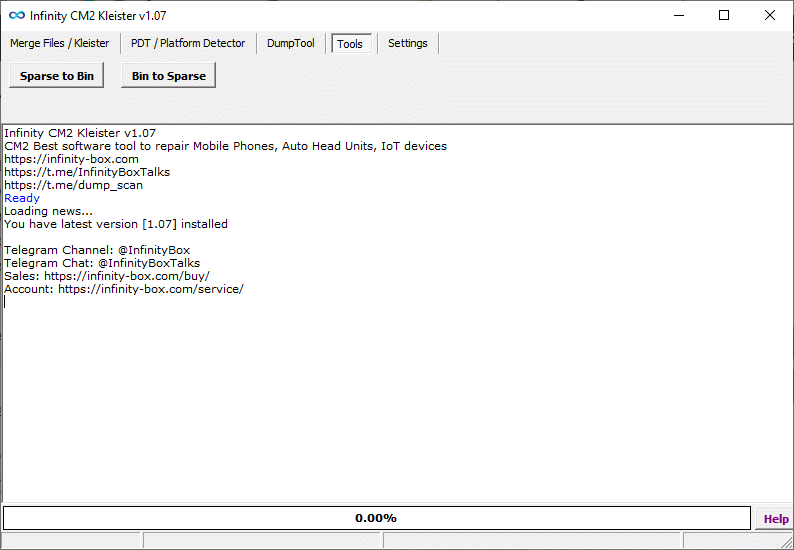
Kleister and pdt platform detector tool dashboard displaying platform detection and device connection options.
- Sparse to Bin
- Bin to Sparse
- Ready Status
- Progress Bar (0.00%)
- Help Button
Settings

Infinity platform detector setup tool dashboard with automatic device platform detection feature.
- Language select
- Notify about updates
- Firmware integrity verification
- Open folder after scan
- Check for updates button
How To Use It ?
- First Of All, You Must Get The Zip File By Clicking The Following Link
- After That, You Need To Unzip All Files In C: Drive (important)
- Make Sure You’ve Turned Off The Antivirus To Running The Installation
- Then, To Open The Folder, Download The Installation File Following Some Basic InstructionsKleister and PDT Platform Detector Tool
- Run The “Kleister And Pdt Platform Detector Tool“
- The Will Open On Your Pc Screen.
Enjoy!
Conclusion
The Kleister And Pdt Platform Detector Tool V1.0.7 Latest Version Is An Essential Tool For Anyone Handling Device Dumps Firmware Backups Or Platform Detection. With Advanced Features Like Merge Files / Kleister Dumptool Sparse-to-bin Conversions And Real-time Progress Monitoring It Offers Unmatched Efficiency And Reliability. Whether You’re A Professional Or A Beginner This Tool Streamlines Complex Operations And Ensures Accuracy In Every Task.
How To Download ?
- Visit The Gsm Crack Tool Website Of The Tool.
- Find The Download Page And Don’t Click Button And Click Only The (Download Link)
- Once The Download Is Complete, Locate The Downloaded File On Your Device.
- Tap On The File To Begin The Installation Process.
- Follow The On-screen Instructions To Complete The Installation.Prime.
Kleister And Pdt Platform Detector Tool


