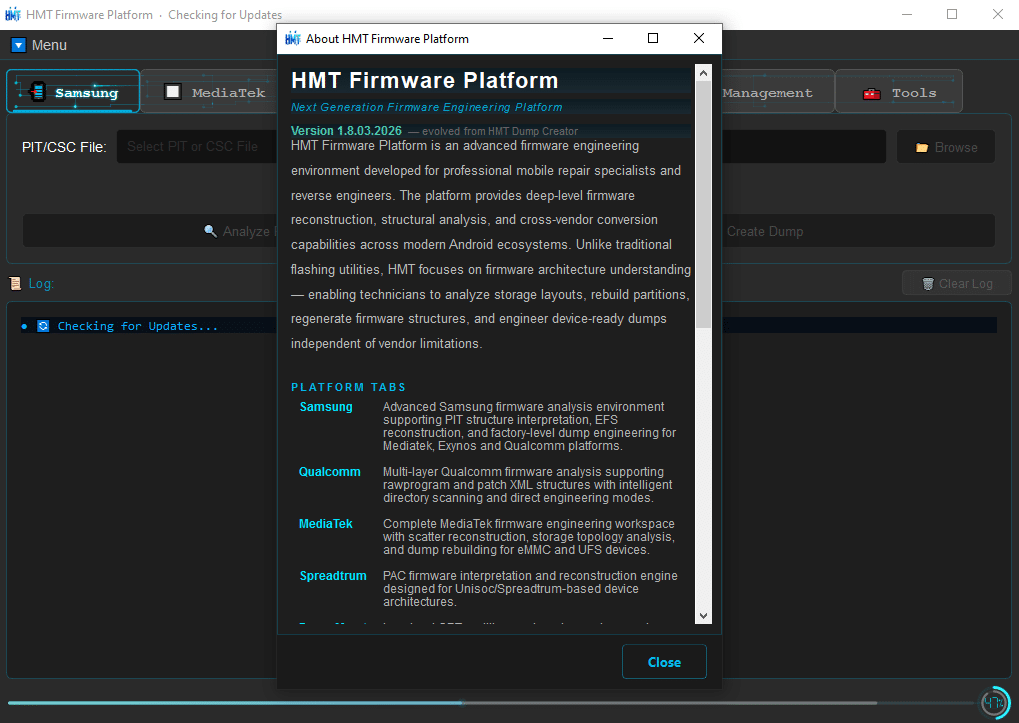
When You Work With Android Firmware Dumps And Device Engineering Files Things Can Get Complicated Fast. Many Technicians Struggle To Rebuild Firmware Dumps Or Analyze Device Partitions Correctly. That’s Where Specialized Tools Become Essential. The Hmt Dump Creator Tool Helps Technicians Analyze Reconstruct And Manage Firmware Structures In A More Organized Way.
In Fact Many Mobile Repair Experts Rely On Professional Dump Engineering Tools To Rebuild Firmware From Raw Files. With The Latest Update Hmt Dump Creator Tool V1.8 Introduces Powerful Capabilities For Samsung Qualcomm Mediatek And Unisoc Devices. If You Want A Smarter Way To Handle Firmware Dumps This Tool Can Save Hours Of Manual Work.
Hmt Dump Creator Tool V1.8 Latest Version Free Download
The Hmt Dump Creator Tool V1.8 Is Designed For Technicians Who Work With Firmware Reconstruction Device Debugging And Low-level Android System Analysis. It Provides A Professional Environment Where You Can Study Firmware Structures Rebuild Dump Files And Interpret Engineering Data Used In Smartphone Repair.
Unlike Simple Flashing Utilities This Tool Focuses On Firmware Engineering And Dump Analysis. That Means It Allows You To Inspect Partitions Rebuild Firmware Structures And Work With Different Chipset Architectures. Whether You’re Repairing A Bricked Phone Or Analyzing Firmware Files This Tool Offers A Structured Workflow That Makes The Process Easier.
What Is The Hmt Dump Creator Tool?
The Hmt Dump Creator Tool Is An Advanced Firmware Engineering Utility Used By Mobile Technicians And Developers. It Helps Analyze Raw Firmware Dumps Rebuild Partition Structures And Interpret System Data Used By Android Devices.
Many Smartphones Store Critical Data Such As Efs Modem Configuration And Partition Tables. If These Files Become Corrupted A Phone May Fail To Boot Or Lose Network Functionality. Using The Hmt Dump Creator Tool Technicians Can Reconstruct Those Files From Firmware Dumps And Restore The Device Structure More Accurately.
features HMT Dump Creator v1.8
Advanced Samsung firmware analysis environment
PIT structure interpretation
EFS reconstruction
Factory-level dump engineering for Mediatek, Exynos, and Qualcomm
Multi-layer Qualcomm firmware analysis
Rawprogram and patch XML structures support
Intelligent directory scanning
Direct engineering modes
Complete MediaTek firmware engineering workspace
Scatter reconstruction
Storage topology analysis
Dump rebuilding for eMMC and UFS devices
PAC firmware interpretation and reconstruction engine
Support for UniSoc/Spreadtrum-based device architectures
How To Use It ?
First Of All, You Must Get The Zip File By Clicking The Following Link
After That, You Need To Unzip All Files In C: Drive (important)
Make Sure You’ve Turned Off The Antivirus To Running The Installation
Then, To Open The Folder, Download The Installation File Following Some Basic InstructionsKleister and PDT Platform Detector Tool
Run The “Hmt Dump Creator Tool“
The Will Open On Your Pc Screen. Enjoy!
Final Thoughts
Firmware Engineering Is A Complex Field That Requires Specialized Tools For Analyzing And Rebuilding System Files. The Hmt Dump Creator Tool V1.8 Provides A Professional Environment Where Technicians Can Work With Firmware Dumps More Efficiently.
From Samsung Pit Interpretation To Qualcomm Rawprogram Analysis And Mediatek Scatter Reconstruction The Tool Covers A Wide Range Of Engineering Tasks. If You Frequently Handle Firmware Repair Or Dump Reconstruction This Software Can Become An Important Part Of Your Technical Toolkit.
How To Download ?
Visit The Gsm Crack Tool Website Of The Tool.
Find The Download Page And Don’t Click Button And Click Only The (Download Link)
Once The Download Is Complete, Locate The Downloaded File On Your Device.
Tap On The File To Begin The Installation Process.
Follow The On-screen Instructions To Complete The Installation.Prime.