


Download gsm rk tool v1 latest version for android device flashing unlocking and repair operations.
If You Work With Android Devices You Know How Frustrating Software Issues Can Be. Frp Locks Bootloop Errors Disabled Adb Or A Stuck Fastboot Screen Can Waste Hours. That’s Where Gsm Rk Tool Comes In. It Gives You Practical Repair Features In One Simple Interface.
Whether You Repair Phones Professionally Or Just Fix Your Own Device This Tool Can Save Time. It Combines Frp Removal Bootloader Options Adb Functions And System Repair Tools In One Place. Let’s Explore Everything You Need To Know.
Gsm Rk Tool V1.1 Latest Version Free Download
The Latest Version Of Gsm Rk Tool V1.1 Brings Several Improvements And Stability Fixes. It Supports Multiple Android Brands Including Samsung Redmi Oppo Realme And Oneplus. The Interface Is Simple So You Don’t Need Advanced Technical Skills To Use It.
Version 1.1 Focuses On Better Fastboot Support And Improved Account Removal Functions. You Also Get Updated Options Like Fastboot To Edl V1 And Fastboot To Edl V2 For Deeper Flashing Tasks. If You Deal With Frp Or Bootloader Problems Regularly This Version Makes Your Workflow Smoother.
What Is The Gsm Rk Tool?
Gsm Rk Tool Is A Windows-based Android Servicing Utility. It Helps Users Perform Tasks Like Frp Removal Bootloader Unlocking Adb Control And System Repair. Instead Of Using Multiple Tools You Can Manage Everything From One Dashboard.
Think Of It Like A Swiss Army Knife For Android Technicians. You Can Refresh Port Read Info Or Enable Adb With A Single Click. It Simplifies Complicated Commands Into Easy Buttons So You Don’t Have To Remember Terminal Codes.
Read More
Future Gsm Rk Tool V1.1
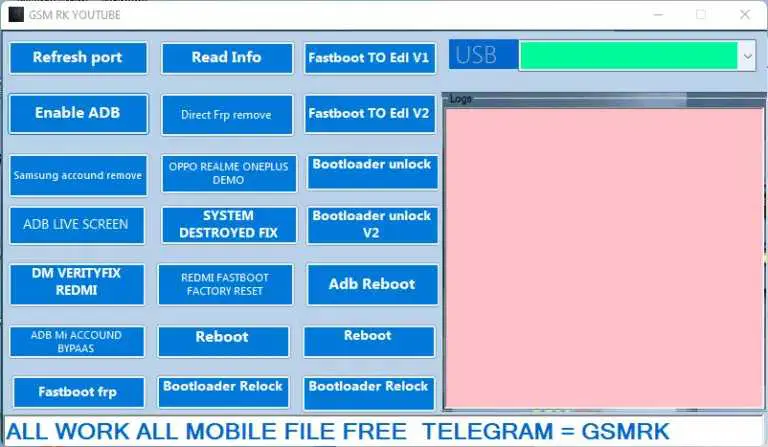
Gsm rk it admin tool dashboard used for device management unlocking and servicing tasks.
- Refresh Port
- Read Info
- Fastboot To Edl V1
- Enable Adb
- Direct Frp Remove
- Fastboot To Edl V2
- Log Dev
- Samsung Account Remove
- Oppo Realme Oneplus Demo
- Bootloader Unlock
- Adb Live Screen
- System Destroyed Fix
- Bootloader Unlock V2
- Dm Verityfix Redmi
- Redmi Fastboot Factory Reset
- Adb Reboot
- Adb Miaccound Bypaas
- Reboot
- Reboot
- Fastboot Frp
- Bootloader Relock
- Bootloader Relock
How To Use It ?
- First Of All, You Must Get The Zip File By Clicking The Following Link
- After That, You Need To Unzip All Files In C: Drive (important)
- Make Sure You’ve Turned Off The Antivirus To Running The Installation
- Then, To Open The Folder, Download The Installation File Following Some Basic InstructionsKleister and PDT Platform Detector Tool
- Run The “Gsm Rk Tool“
- The Will Open On Your Pc Screen.
Enjoy!
Final Thought
If You Regularly Repair Android Devices Gsm Rk Tool V1.1 Is Worth Trying. It Combines Frp Removal Bootloader Management And System Repair In One Clean Interface. The Tool Simplifies Complex Technical Steps Into Easy Actions.
For Technicians It Reduces Workload. For Beginners It Removes Confusion. Just Make Sure You Use The Right Function For The Right Device. When Used Properly Gsm Rk Tool Can Become A Reliable Part Of Your Android Repair Toolkit.
How To Download ?
- Visit The Gsm Crack Tool Website Of The Tool.
- Find The Download Page And Don’t Click Button And Click Only The (Download Link)
- Once The Download Is Complete, Locate The Downloaded File On Your Device.
- Tap On The File To Begin The Installation Process.
- Follow The On-screen Instructions To Complete The Installation.Prime.
Gsm Rk Tool


