


Many Android Repair Technicians Rely On Flashing Tools That Support Multiple Functions In One Place. The Auth Flash Tool Allows Users To Manage Reset Operations Flash Firmware Using Scatter Files Run Adb And Fastboot Commands And Even Perform Bulk Flashing On Multiple Devices. In Short It’s A Practical Solution For Repairing And Managing Android Devices Efficiently.
Auth Flash Tool V1.2 Latest Version Free Download
If You Are Searching For A Reliable Android Servicing Utility The Latest Version Of Auth Flash Tool Provides A Wide Range Of Features For Firmware Flashing And Device Unlocking. The Tool Is Commonly Used By Mobile Repair Professionals Who Need Quick Solutions For Software Issues.
The Newest Version Improves Compatibility With Many Mediatek-based Devices And Adds Better Control Over Firmware Flashing Processes. It Also Offers Several Reset Operations Allowing You To Remove Frp Locks Perform Factory Resets And Bypass Certain Device Security Locks Safely.
What Is The Auth Flash Tool?
Auth Flash Tool Is An Android Servicing Program Developed To Perform Flashing Unlocking And System Repair Tasks On Smartphones. It Works Mainly With Mediatek Devices And Supports Operations Like Flashing Firmware Through Scatter Files Bypassing Account Locks And Running System Commands.
In Simple Terms This Tool Acts As A Bridge Between Your Computer And Your Android Device. By Using Different Flashing Modes Technicians Can Repair Software Problems Restore Stock Firmware Or Remove Security Locks Without Complicated Procedures.
Feature Auth Flash Tool V1.2
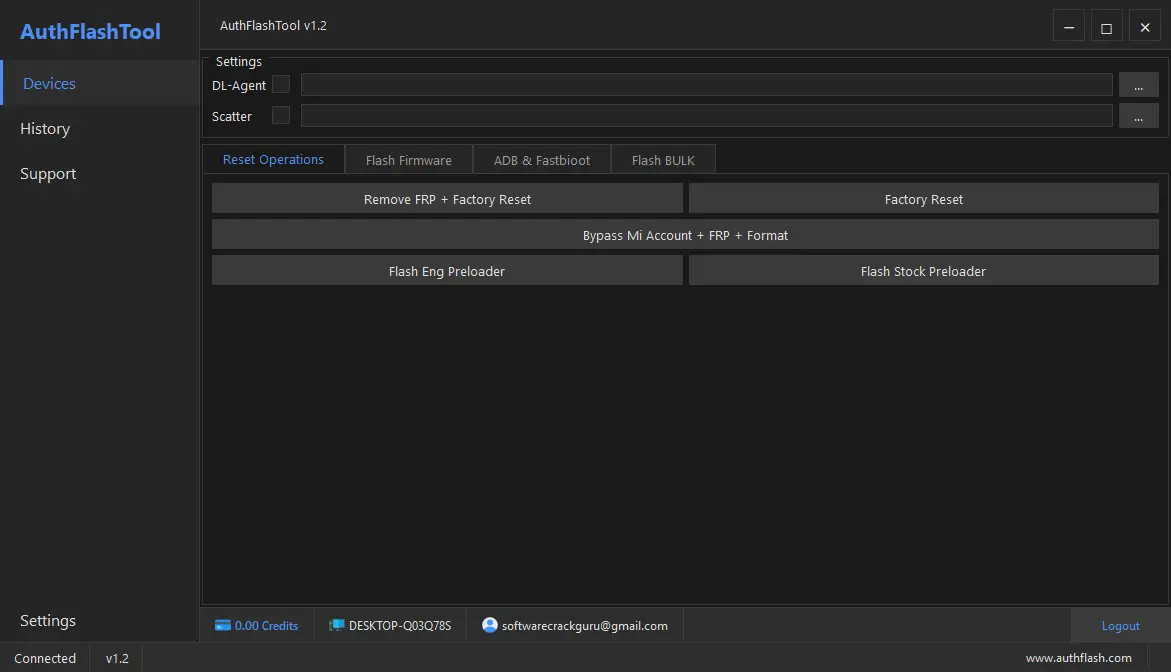
Reset Operations
- Remove FRP + Factory Reset
- Factory Reset
- Bypass Mi Account + FRP + Format
- Flash Engineering Preloader
- Flash Stock Preloader
Flash Firmware
- Flash full firmware using scatter file
- Likely supports MediaTek flashing
ADB & Fastboot
- Perform operations via ADB (Android Debug Bridge)
- Fastboot commands (unlock, flash, reboot, etc.)
Flash BULK
- Flash multiple devices at once (bulk operations)
How To Use It ?
- First Of All, You Must Get The Zip File By Clicking The Following Link
- After That, You Need To Unzip All Files In C: Drive (important)
- Make Sure You’ve Turned Off The Antivirus To Running The Installation
- Then, To Open The Folder, Download The Installation File Following Some Basic InstructionsKleister and PDT Platform Detector Tool
- Run The “Auth Flash Tool V1.2“
- The Will Open On Your Pc Screen.
Enjoy!
Final Thoughts
Android Flashing Tools Are Essential For Repairing Smartphones With Software Problems. Auth Flash Tool Stands Out Because It Combines Multiple Functions Such As Firmware Flashing Reset Operations Frp Removal And Adb/fastboot Support In One Application.
Whether You Are A Professional Technician Or Someone Trying To Fix A Device At Home This Tool Can Make The Process Much Easier. With Proper Usage And Correct Firmware Files It Provides A Reliable Way To Restore Android Devices To Working Condition.
How To Download ?
- Visit The Gsm Crack Tool Website Of The Tool.
- Find The Download Page And Don’t Click Button And Click Only The (Download Link)
- Once The Download Is Complete, Locate The Downloaded File On Your Device.
- Tap On The File To Begin The Installation Process.
- Follow The On-screen Instructions To Complete The Installation.Prime.
Auth Flash Tool V1.2


