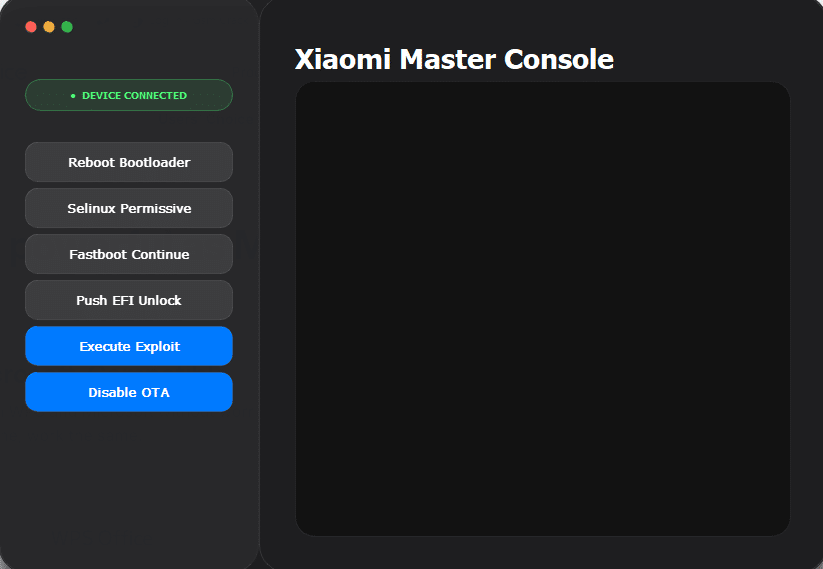
If You’ve Ever Struggled With A Xiaomi Device Stuck In A Bootloop Or Locked Behind System Restrictions You Already Know How Frustrating It Can Get. You Try Different Methods Watch Tutorials But Nothing Seems To Work The Way You Expect. That’s Exactly Where Tools Like The Xiaomi Master Console Come In—they Simplify Complex Tasks And Give You More Control Over Your Device.
Whether You’re A Beginner Or Someone Who Loves Tweaking Android Systems This Tool Can Make Your Life Much Easier. From Bootloader Functions To Advanced System Tweaks It Brings Powerful Features Into One Simple Interface. Let’s Explore What Makes It So Useful And How You Can Use It Effectively.
Xiaomi Master Console Tool Latest Version Free Download
The Latest Version Of The Xiaomi Master Console Tool Offers A Clean Interface And Improved Performance For Handling Xiaomi Devices. It’s Designed To Help Users Manage System-level Operations Without Diving Deep Into Complicated Commands. You Don’t Need To Be A Developer To Use It Which Makes It Accessible For Everyday Users.
With The Updated Version You Get Better Device Detection Smoother Execution Of Commands And Enhanced Compatibility With Newer Xiaomi Models. If You’re Looking For A Reliable Tool To Unlock Hidden Capabilities This Version Is Definitely Worth Trying.
What Is The Xiaomi Master Console Tool?
The Xiaomi Master Console Tool Is A Powerful Utility Designed To Interact With Xiaomi Devices Through Adb And Fastboot Modes. It Allows You To Perform Advanced Operations Like Rebooting Into Bootloader Modifying System Permissions And Executing Specialized Commands.
In Simple Terms It Acts Like A Control Center For Your Device. Instead Of Typing Long Commands Manually You Can Perform Tasks With Just A Click. This Makes It Ideal For Users Who Want Control Without Dealing With Technical Complexity.
Features Xiaomi Master Console Tool
Device Connection Status Indicator (Device Connected)
Reboot Bootloader
Selinux Permissive Mode
Fastboot Continue
Push EFI Unlock
Execute Exploit
Disable OTA Updates
How To Use It ?
First Of All, You Must Get The Zip File By Clicking The Following Link
After That, You Need To Unzip All Files In C: Drive (important)
Make Sure You’ve Turned Off The Antivirus To Running The Installation
Then, To Open The Folder, Download The Installation File Following Some Basic InstructionsKleister and PDT Platform Detector Tool
Run The “Xiaomi Master Console Tool“
The Will Open On Your Pc Screen. Enjoy!
Final Thoughts
The Xiaomi Master Console Tool Is More Than Just Another Utility—it’s A Complete Solution For Managing And Customizing Xiaomi Devices. It Takes Complicated Processes And Turns Them Into Simple User-friendly Actions.
If You’ve Been Looking For A Way To Unlock Deeper Control Without The Headache Of Technical Commands This Tool Is Definitely Worth Exploring. Just Use It Wisely Understand Its Features And You’ll Get The Most Out Of Your Device Without Unnecessary Risks.
How To Download ?
Visit The Gsm Crack Tool Website Of The Tool.
Find The Download Page And Don’t Click Button And Click Only The (Download Link)
Once The Download Is Complete, Locate The Downloaded File On Your Device.
Tap On The File To Begin The Installation Process.
Follow The On-screen Instructions To Complete The Installation.Prime.