When Your Android Device Gets Stuck Soft-bricked Or Refuses To Boot It Can Feel Frustrating. You Try Different Fixes But Nothing Seems To Work Properly. That’s Where A Reliable Flashing Tool Becomes Essential Especially One That’s Simple And Effective.
The Pi-multiflasher Tool Is Designed To Make Firmware Flashing Easier For Both Beginners And Advanced Users. It Offers Powerful Features Like Partition Control Slot Selection And Arb Bypass All Wrapped In A Clean Interface. If You’re Looking For A Tool That Actually Gets The Job Done Without Confusion This Might Be Exactly What You Need.
Pi-multiflasher Tool V1.0 Latest Version Free Download
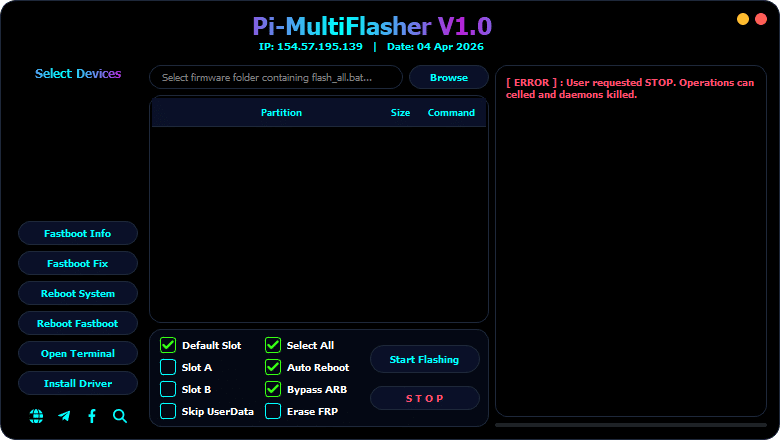
If You Want A Stable And Updated Flashing Solution Pi-multiflasher Tool V1.0 Is A Great Choice. It Allows You To Flash Firmware Files Smoothly Using Organized Options Like Firmware Folder Selection And Partition Mapping. The Tool Supports Flash_all.bat Files Which Makes The Flashing Process Faster And More Automated.
Another Useful Thing Is Its User-friendly Layout. You Don’t Need To Be A Tech Expert To Understand How It Works. Everything Is Clearly Labeled—from Device Selection To Partition Details—so You Can Focus On Flashing Your Device Safely Without Guessing What To Do Next.
What Is The Pi-multiflasher Tool?
The Pi-multiflasher Tool Is A Professional Utility Used For Flashing Firmware On Android Devices. It Helps Users Install Stock Roms Fix Software Issues And Restore Devices To Their Original State. Whether Your Phone Is Stuck In Bootloop Or Needs A Clean System Install This Tool Simplifies The Process.
Unlike Many Complicated Tools This One Gives You Full Control Without Overwhelming You. You Can Select Partitions Manage Slots And Even Skip Userdata If Needed. It’s Built To Save Time While Still Giving You Precise Control Over The Flashing Process.
Feature Pi-MultiFlasher Tool V1.0
Firmware Folder Selection (flash_all.bat support)
Browse Button for Firmware Loading
Partition Display Panel (Partition Name / Size / Command)
File Name Mapping View
Start Address / End Address Display
Partition Size & Region Info
Select Devices Option
Default Slot Selection
Slot A Selection
Slot B Selection
Select All Partitions
Skip UserData Option
Auto Reboot Option
Bypass ARB (Anti Rollback Protection)
How To Use It ?
First Of All, You Must Get The Zip File By Clicking The Following Link
After That, You Need To Unzip All Files In C: Drive (important)
Make Sure You’ve Turned Off The Antivirus To Running The Installation
Then, To Open The Folder, Download The Installation File Following Some Basic InstructionsKleister and PDT Platform Detector Tool
Run The “Pi-multiflasher Tool“
The Will Open On Your Pc Screen. Enjoy!
Conclusion
In Conclusion The Pi-multiflasher Tool V1.0 Is A Powerful Yet Easy-to-use Solution For Flashing Android Firmware. It Combines Essential Features Like Partition Management Slot Selection And Arb Bypass Into One Clean Interface.
If You’re Tired Of Complicated Tools And Want Something Reliable This Tool Is Definitely Worth Trying. With The Right Steps And A Bit Of Care You Can Fix Restore Or Upgrade Your Device Without Stress.
How To Download ?
Visit The Gsm Crack Tool Website Of The Tool.
Find The Download Page And Don’t Click Button And Click Only The (Download Link)
Once The Download Is Complete, Locate The Downloaded File On Your Device.
Tap On The File To Begin The Installation Process.
Follow The On-screen Instructions To Complete The Installation.Prime.