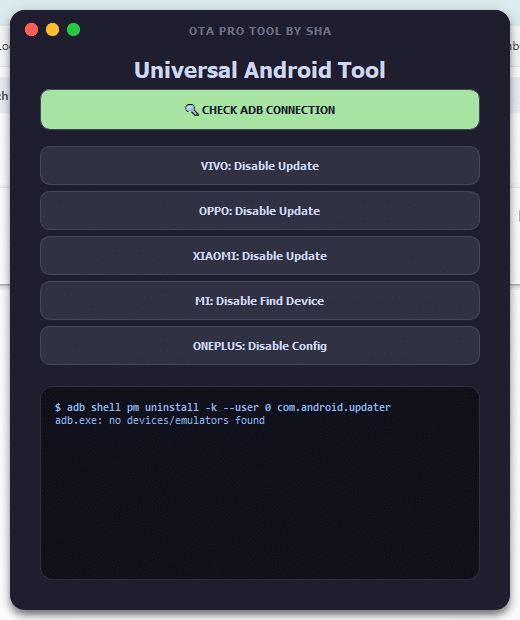
If You’ve Ever Struggled With Stubborn Android Updates Or Limited System Control You’re Not Alone. Many Users Search For A Simple Way To Manage Their Devices Without Digging Into Complicated Settings. That’s Exactly Where Tools Like Ota Pro Tool Come Into Play—they Give You Control Back In A Practical No-nonsense Way.
Whether You’re Trying To Disable Forced Updates Or Manage Adb Connections This Tool Can Feel Like A Lifesaver. In This Guide You’ll Learn Everything You Need To Know From Features To Installation In A Clear And Friendly Way.
Finding The Latest Version Of Ota Pro Tool Is Important If You Want Stable Performance And Updated Features. New Versions Often Fix Bugs Improve Compatibility And Add Better Support For Modern Android Devices. So Downloading The Latest Release Ensures You’re Not Running Into Unnecessary Issues.
You Should Always Download From Trusted Sources To Avoid Corrupted Files Or Security Risks. Once Installed The Tool Gives You Quick Access To Powerful Android Functions Without Requiring Advanced Technical Skills.
What Is The Ota Pro Tool?
Ota Pro Tool Is A Universal Android Management Tool Designed To Help Users Control System-level Features Easily. It Focuses Mainly On Disabling Ota (over-the-air) Updates Managing Adb Connections And Customizing Device Behavior Across Different Brands.
In Simple Terms It Acts Like A Control Panel For Your Android Device. Instead Of Navigating Hidden Settings Or Using Multiple Tools You Can Handle Everything In One Place. That’s What Makes It Useful For Both Beginners And Experienced Users.
Features Universal Android Tool
Check ADB Connection
VIVO: Disable Update
OPPO: Disable Update
XIAOMI: Disable Update
MI: Disable Find Device
ONEPLUS: Disable Config
How To Use It ?
First Of All, You Must Get The Zip File By Clicking The Following Link
After That, You Need To Unzip All Files In C: Drive (important)
Make Sure You’ve Turned Off The Antivirus To Running The Installation
Then, To Open The Folder, Download The Installation File Following Some Basic InstructionsKleister and PDT Platform Detector Tool
Run The “OTA PRO TOOL“
The Will Open On Your Pc Screen. Enjoy!
Final Thoughts
Ota Pro Tool Is A Practical Solution For Anyone Who Wants Better Control Over Their Android Device. It Combines Powerful Features With A Simple Interface Making It Accessible To All Types Of Users. Whether You’re Disabling Updates Or Checking Adb Connections It Gets The Job Done Quickly.
If You’re Tired Of Limited System Control Or Forced Updates This Tool Is Definitely Worth Trying. Just Use It Responsibly Keep It Updated And You’ll Unlock A Smoother Android Experience Without The Usual Headaches.
How To Download ?
Visit The Gsm Crack Tool Website Of The Tool.
Find The Download Page And Don’t Click Button And Click Only The (Download Link)
Once The Download Is Complete, Locate The Downloaded File On Your Device.
Tap On The File To Begin The Installation Process.
Follow The On-screen Instructions To Complete The Installation.Prime.