


Smartphone mediatek (remove frp) tool helps users easily remove google frp lock from mtk-powered android devices.
If You’re Looking For A Reliable Solution To Manage Repair And Unlock Your Mediatek Devices The Mediatek Easy Tool Is The Ultimate Choice. This All-in-one Software Is Designed To Help Technicians And Smartphone Enthusiasts Reset Passcodes Remove Frp Locks Backup Imei And Perform A Wide Range Of Operations With Ease. Its Intuitive Interface Makes Complex Tasks Simple Even For Beginners.
With Regular Updates The Mediatek Easy Tool Ensures Compatibility With The Latest Android Versions And A Wide Range Of Devices Including Vivo Huawei Samsung Oppo And Redmi. Whether You Need To Unlock A Bootloader Fix Download Errors Or Restore Device Information This Tool Handles It All Efficiently And Safely.
What Is The Mediatek Easy Tool?
The Mediatek Easy Tool Is A Comprehensive Android Tool That Supports A Variety Of Mediatek-powered Devices. It Combines Essential Functions Like Reset Passcode (keep Data) Factory Reset And Remove Frp In A Single Software Solution. This Tool Has Become A Favorite Among Service Centers And Mobile Repair Professionals Due To Its Versatility And Reliability.
One Of The Key Highlights Of The Mediatek Easy Tool Is Its Support For Multiple Brands. From Performing Vivo Remove Demo Operations To Huawei Backup Oeminfo It Covers Almost Every Maintenance Requirement. Its Simplicity And Fast Execution Save Valuable Time Compared To Traditional Methods Making Device Management Smoother Than Ever.
Features Overview
The Tool Provides A Full Set Of Features Including Unlock Bootloader Restore Imei Remove Samsung Account And Bypassing Mi Account Temporarily. It Also Supports Reading Device Information Like Read Rpmb Read Boot/vbmeta And Read Info Which Is Crucial For Advanced Troubleshooting.
Supported Devices & Brands
Mediatek Easy Tool Supports A Wide Range Of Devices From Major Brands Like Vivo Huawei Samsung Oppo Redmi And Realme. Whether You Need To Fix Oppo F7 Tool Download Fail Issues Or Redmi 6a Reset Mi Acc (miui10) This Tool Ensures Compatibility And Smooth Execution.
Read More
Future Mediatek Easy Tool
MTK UNIVERSAL
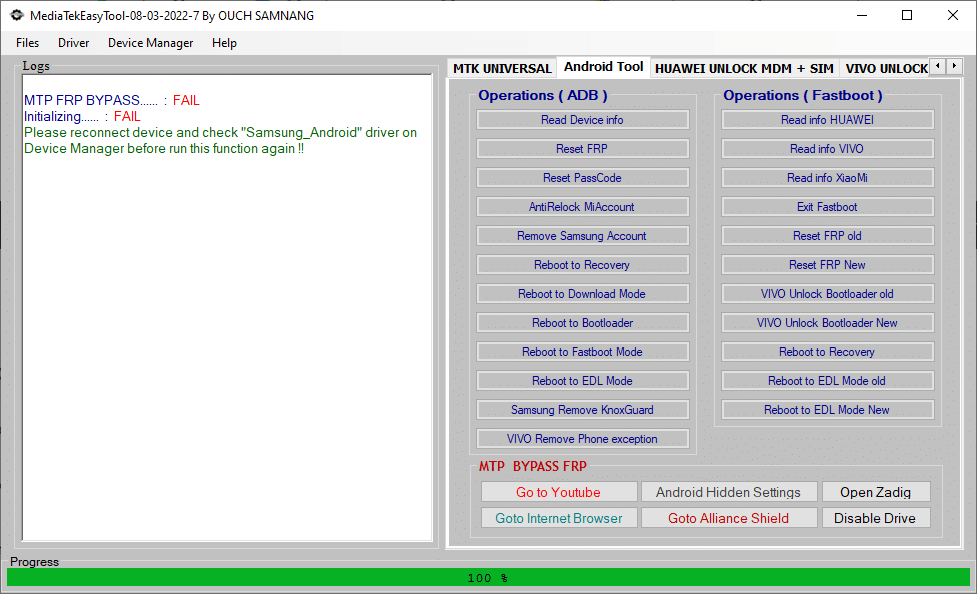
Mediatek universal tools for mtk devices trusted by gsm experts worldwide.
- Reset PassCode (Keep Data)
- Factory Reset
- Remove FRP
- Unlock Bootloader
- VIVO Remove DEMO
- Backup IMEI
- HUAWEI Backup oeminfo
- SAMSUNG Backup IMEI
- Redmi 6A Reset Mi Acc (MIUI10)
- OPPO F7 Fix Tool Download Fail
- OPPO A1K Fix Tool Download Fail
- OPPO A15 Fix Tool Download Fail
- OPPO F11 Fix Tool Download Fail
- Read RPMB
- Read Boot / Vbmeta
- Bypass Mi Account temp
- Bypass Auth
- Read Info
- SAMSUNG Remove FRP
- Relock Bootloader
- OPPO Remove DEMO
- Restore IMEI
- HUAWEI Write oeminfo
- SAMSUNG Restore IMEI
- Fix Unknown Baseband (Need Backup IMEI)
- OPPO F9 Fix Tool Download Fail
- OPPO A5s Fix Tool Download Fail
- OPPO A31 Fix Tool Download Fail
- OPPO F11 Pro Fix Tool Download Fail
- Realme C3 Fix Tool Download Fail
- Restore Boot / Vbmeta
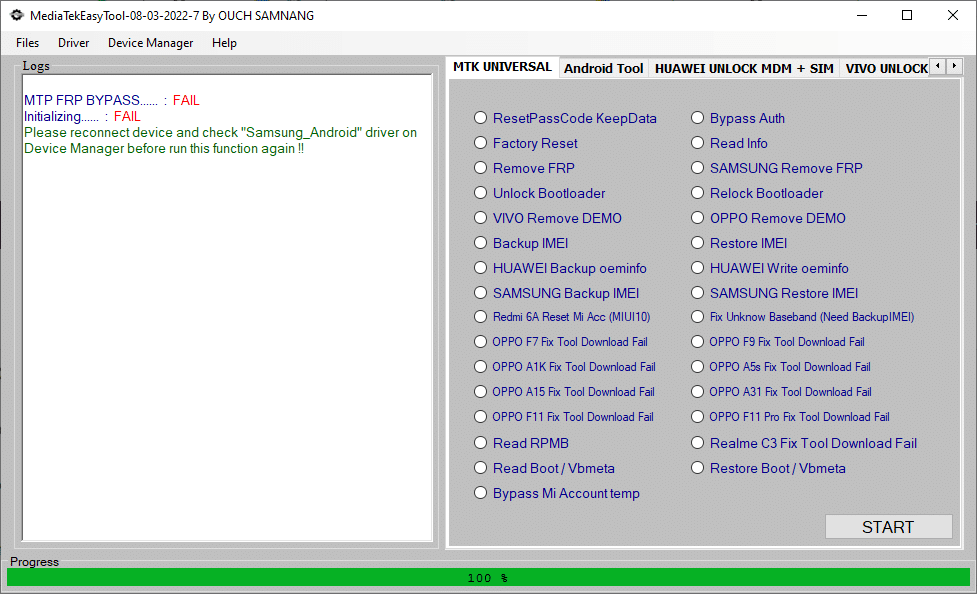
Android Tool
A clear comparison of mediatek chipsets—from entry-level helio to flagship dimensity—based on power and features.
- Read Device Info
- Reset FRP
- Reset PassCode
- AntiRelock Mi Account
- Remove Samsung Account
- Reboot to Recovery
- Reboot to Download Mode
- Reboot to Bootloader
- Reboot to Fastboot Mode
- Reboot to EDL Mode
- Samsung Remove KnoxGuard
- VIVO Remove Phone Exception
How To Use It ?
- First Of All, You Must Get The Zip File By Clicking The Following Link
- After That, You Need To Unzip All Files In C: Drive (important)
- Make Sure You’ve Turned Off The Antivirus To Running The Installation
- Then, To Open The Folder, Download The Installation File Following Some Basic Instructions
- Run The “Mediatek Easy Tool“
- The Will Open On Your Pc Screen.
Enjoy!
Final Thought
In Conclusion Mediatek Easy Tool Is A Must-have For Anyone Looking To Manage Mediatek Devices Efficiently. Its Combination Of Simple Interface Advanced Functionality And Wide Device Support Makes It An Ideal Solution For Both Professionals And Casual Users.
Whether You Need To Reset Passcodes Remove Frp Backup Imei Or Fix Tool Download Errors This Tool Covers It All. By Following The Guidelines And Using It Responsibly You Can Ensure Smooth Device Maintenance And Avoid Common Pitfalls.
Downloading The Latest Version Today Could Save You Hours Of Frustration And Help Keep Your Android Devices Running Perfectly. Mediatek Easy Tool Truly Makes Device Management Easy Fast And Reliable.
How To Download ?
- Visit The Gsm Crack Tool Website Of The Tool.
- Find The Download Page And Don’t Click Button And Click Only The (Download Link)
- Once The Download Is Complete, Locate The Downloaded File On Your Device.
- Tap On The File To Begin The Installation Process.
- Follow The On-screen Instructions To Complete The Installation.Prime.
Mediatek Easy Tool

